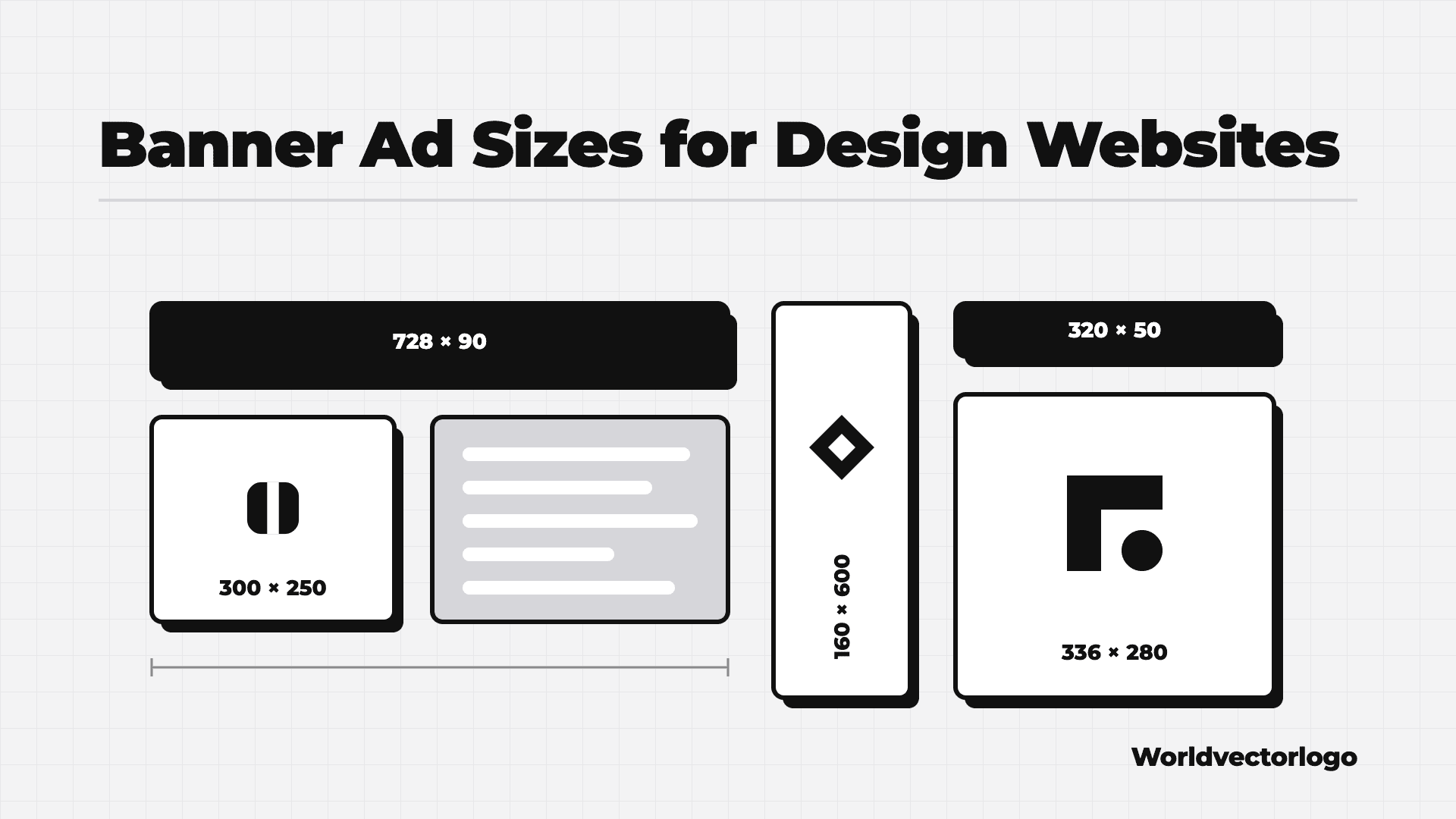
The most common banner ad sizes are 728 × 90 (leaderboard), 300 × 250 (medium rectangle) and 320 × 50 (mobile banner). Other standard sizes include 300 × 600, 336 × 280, 160 × 600 and 970 × 250. On Worldvectorlogo, we sell 728 × 90, 320 × 50 and 300 × 250. Keep each static file small: Google Ads accepts uploaded image ads up to 150 KB.
This post is published by Worldvectorlogo. We sell banner ads in three of the sizes below. We checked sizes and file rules on the IAB’s and Google’s own pages on October 31, 2026.
At a Glance
The IAB (Interactive Advertising Bureau) sets ad standards for the industry. Its fixed size ad specifications, part of its New Ad Portfolio, list a maximum “initial load” for each size. That is the file weight an ad may load before the page finishes loading.
| Size (px) | Name | IAB Max Initial Load | In Google Ads List | Sold on Worldvectorlogo |
|---|---|---|---|---|
| 728 × 90 | Leaderboard | 150 kB | Yes | Yes: Top Leaderboard, Sticky Banner |
| 300 × 250 | Medium Rectangle | 150 kB | Yes | Yes: Sidebar Banner |
| 320 × 50 | Smartphone Banner | 50 kB | Yes | Yes: Top Leaderboard, Sticky Banner (mobile) |
| 300 × 600 | Half Page | Not in the fixed size table | Yes | No |
| 336 × 280 | Large Rectangle | Not in the fixed size table | Yes | No |
| 160 × 600 | Skyscraper | 150 kB | Yes | No |
| 970 × 250 | Billboard | 250 kB | Yes | No |
| 970 × 90 | Super Leaderboard | 200 kB | Yes | No |
| 300 × 1050 | Portrait | 250 kB | Yes | No |
The “In Google Ads List” column uses Google’s uploaded display ads specifications. Google also lists 320 × 100, 300 × 50, 468 × 60 and a few other sizes.
1. Leaderboard: 728 × 90
The leaderboard is a wide, short banner. It usually sits at the top of a page. Google’s AdSense size guide lists it as a top-performing size. Google says it “performs well if placed above the main content.”
- IAB max initial load: 150 kB
- Only 90 pixels tall, so use one short line of text
- On Worldvectorlogo: our Top Leaderboard and Sticky Banner on desktop
Best for: brand awareness at the top of the page.
2. Medium Rectangle: 300 × 250
The medium rectangle is a box-shaped ad. Google Ads calls it the “inline rectangle.” AdSense lists it as a top-performing size. Google says it “performs well when embedded within text content or at the end of articles.”
- IAB max initial load: 150 kB
- More height than a leaderboard, so it fits a product image and a button
- On Worldvectorlogo: our Sidebar Banner
Best for: showing your product, such as a screenshot, a font sample or a template.
3. Mobile Banner: 320 × 50
The 320 × 50 banner is the standard small mobile ad. The IAB calls it the “Smartphone Banner.” AdSense calls it a “mobile leaderboard.” Google says these ads “have been shown to work well as a large smartphone ad format.”
- IAB max initial load: 50 kB, the smallest of the three
- Very little space: use your logo, a few words and a button
- On Worldvectorlogo: our Top Leaderboard and Sticky Banner on mobile
Best for: reaching phone users with one clear message.
4. Other Common Sizes
Other sites may ask for these sizes. All are in Google’s list of uploaded image ad sizes.
- 300 × 600 (half page): Google says it is “one of the fastest growing sizes by impressions.”
- 336 × 280 (large rectangle): a bigger version of the 300 × 250, also a top AdSense size.
- 320 × 100 (large mobile banner): Google says it can replace the 320 × 50 and the 300 × 250.
- 160 × 600 (wide skyscraper): a tall, narrow ad for side columns.
- 970 × 250 (billboard): a large ad across the top of a page.
Best for: campaigns that run on many sites or ad networks at once.
File Size and Format Rules
Each site sets its own limits. These are the published rules from Google and the IAB:
- Google Ads: uploaded image ads can be up to 150 KB, in GIF, JPG or PNG.
- Google Ads: animation must be 30 seconds or shorter. Loops must stop after 30 seconds. Animated GIFs must be slower than 5 FPS (frames per second).
- IAB: for static image ads, its sizing grid suggests about 50 kB for 320 × 50, 100 kB for 728 × 90 and 150 kB for 300 × 250.
- IAB: on slow connections (3G or slower), file weights should be 30% less than recommended.
- IAB: an ad must be clearly different from the site’s own content, for example with a clear border.
The IAB calculates file weights for fixed sizes at double density (2x) resolution. If a site accepts it, export a 2x file, such as 1456 × 180 for a 728 × 90 slot. Then compress it to stay within the limit.
Design Tips for Banner Ads
- Use one message per banner. Use a short headline, not a list of features.
- Use a vector logo, so it stays sharp at every size. You can find logos in SVG on Worldvectorlogo.
- Add a clear button, such as “Try Free.” Make it look like a button.
- Test text at real size. Words that look fine on a big screen may be too small on a 320 × 50 banner.
- Use strong contrast between text and background.
- Design each size on its own. Do not just shrink the leaderboard into a mobile banner.
How to Choose
- Ask each site for its exact sizes and limits before you design.
- Start with 728 × 90, 300 × 250 and 320 × 50. These three cover desktop and mobile on our site, and all three are in Google’s list.
- Plan your budget along with your files. Our guide to the cost to advertise to designers compares prices.
- Pick the right sites for your product. See how to advertise an AI tool or how to advertise fonts and stock content.
FAQ
What Is the Most Common Banner Ad Size?
The 300 × 250 medium rectangle and the 728 × 90 leaderboard. Google lists both as top-performing sizes, and both are in the IAB’s fixed size list.
What Is the Standard Mobile Banner Size?
320 × 50. The IAB lists it as the Smartphone Banner, with a 50 kB max initial load. 320 × 100 is a larger option.
How Big Can a Banner Ad File Be?
Google Ads allows 150 KB for uploaded image ads. IAB limits depend on the size. Always check the site’s own rules.
Which Banner Sizes Does Worldvectorlogo Sell?
We sell 728 × 90 and 320 × 50 for the Top Leaderboard and Sticky Banner, and 300 × 250 for the Sidebar Banner. Packages start at $1,500 per campaign, a set number of impressions over one month.
Have your banners ready? Show them to 750K+ designers, developers and creators each month. See our ad packages.